
Using a Member Credential to electronically sign applications is currently being piloted by select lawyers. Member Credential is a generic term LTSA uses for any verifiable credential issued by a regulator that can be used to electronically sign Web Filing forms. The actual name of the credential issued by a regulator to its professional members may vary. For example, the credential issued by the Law Society of British Columbia to its members is called the Lawyer Credential.
Before you can e-sign Web Filing forms using a Member Credential, you must apply for a Lawyer Credential from the Law Society of British Columbia and install BC Wallet on your mobile phone.
Step 1 : Obtain a Member Credential from the Law Society of BC
- Go to the Law Society of British Columbia website
- Navigate to "Member Portal" and log in
- Go to the "Lawyer Credential" page, then select Issue, revoke, re-issue or check the status of your "Lawyer Credential" digital credential
- Select Proceed, then Get started
- Click I have my wallet if you have already installed BC Wallet on your mobile phone, then proceed to Step 3
If not, continue to Step 2 to install BC Wallet
Step 2 : Install BC Wallet on your mobile phone

- Go to Apple App Store or Google Play Store to download and install BC Wallet
- Follow the prompts and click Accept the terms of use
- Enter a 6-digit PIN and re-enter it, and click Create PIN
- (Optional) Enable biometrics to unlock your wallet by selecting the toggle button, then click Continue
- Click Continue to enable push notifications
- Return to the Law Society of BC website then select I have my wallet
Step 3 : Add the credential to BC Wallet
- After clicking I have my wallet, a QR code will be displayed on your screen
Open the BC Wallet app on your phone then tap the Scan icon
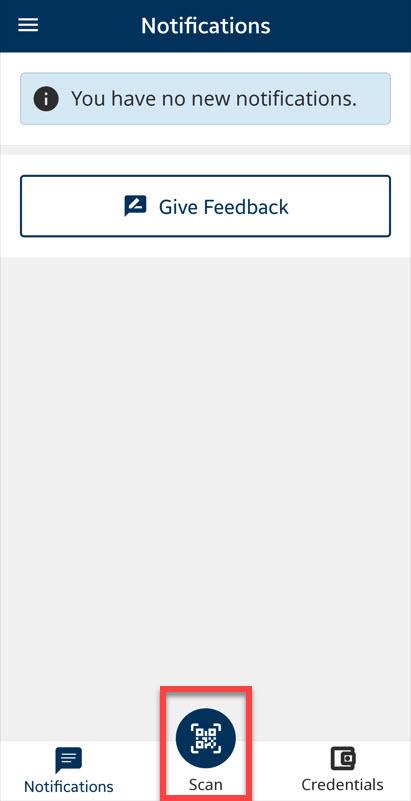
- Click Continue to allow camera use
- Use your mobile phone’s camera to scan the QR code displayed on your screen
- If the scan is successful, the Law Society of BC will send you a Credential Offer
- Click View Offer, then click Accept to add the Lawyer Credential
Review the newly added credential in the Credentials tab
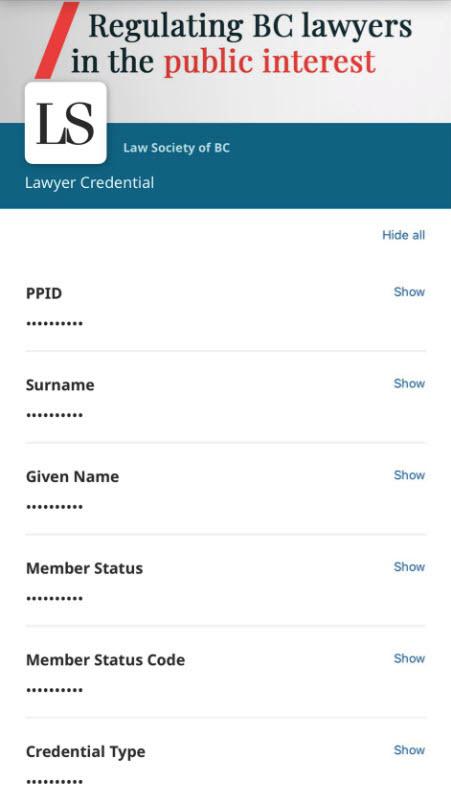
You have successfully added your Member Credential to your BC Wallet.