
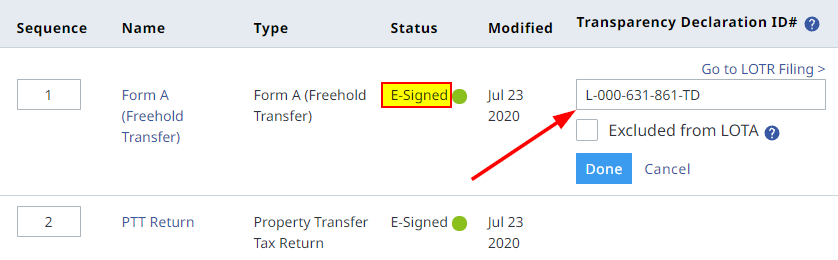
If the Land Title application was prepared in Web Filing, a Transparency Declaration ID field will appear beside the freehold transfer form once it is E-signed. Enter the LOTR ID and click Done.
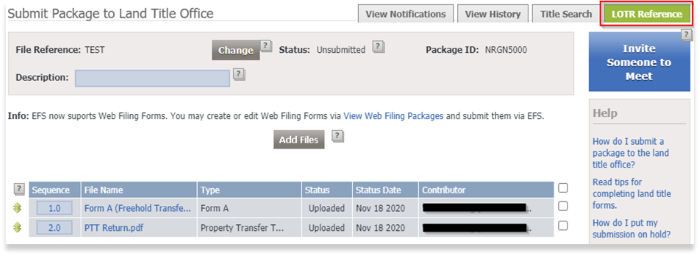
Alternatively, if the application was uploaded to the EFS Submission dashboard, open the land title package and click on the LOTR Reference tab:
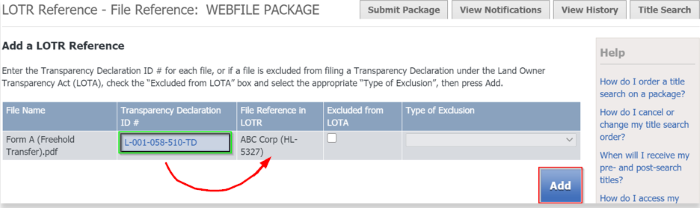
Enter the transparency declaration ID in the field provided. The file reference used for the LOTR filing will automatically appear beside this field once entered. Use this information to confirm that the correct ID is entered and then click Add. The transparency declaration ID can be found at the top of the transparency declaration form:
Click on the Submit Package tab to return to the land title package and click on the Submit button to register the package.
In the LOTR filing dashboard, the transparency record is now in the Filed tab.
Customers are advised to pay close attention to ensure that the correct transparency declaration ID is associated with their land title package submission. If an incorrect ID is used, the LOTA Administrator is unable to reverse the action and the only option available to the customer is to withdraw the land title package and re-file the submission with the correctly linked transparency declaration ID. If an incorrect transparency declaration ID has been associated with a land title submission that has already been registered, customers should contact lotr@ltsa.ca to advise the LOTA Administrator.